div#footer
{
   clear: both;
   padding: .5em 1em;
   border-top: 0px solid #ccc;
   text-align: center;
   padding: 0 0 0 0;
   margin: -20px 0 0 -100px;
   position: fixed;
   left : 50%;
   top: 100%;
}
Friday, September 25, 2009
How to stick the footer to the buttom of the page
As usual there are more roads leading to Mekka. This is one way of getting the same result without any scripts. It uses a simple cascading stylesheet:


Monday, September 21, 2009
IIS Url Forwarding
One easy way of forwarding can be stablished from within the Web.config in the system.web section:
<urlmappings enabled="true"><blockquote><p><urlmappings enabled="true">
<add mappedurl="~/default.aspx?parm1=1" url="~/home">
<add mappedurl="~/Products.aspx" url="~/products">
<add mappedurl="~/Product.aspx?id=1" url="~/product">
</urlmappings>
How do I secure my browser - Part
I came across a web address that has phishing software. It was www.secure-logins.com. I figured out that this is not the only address in tis domain that has the worm, any address ending to the same domain is doing the same harm. So I had to find a way to stop all the requests going from my browser (or even better from my house) to this domain. This is what I did:
I. Tell your browser never go to that domain.
II. let your router know that this domain should be filtered.
Although the second way is enough to stop the worm but I thought some people might not have the feature in their router to do that, so I also mentioned the first one.
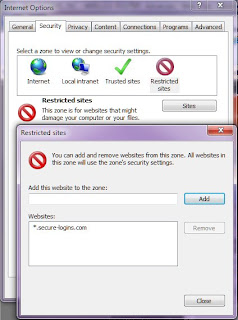
1. In the Internet Explorer go to Menu Tools->Internet Options and when the Internet Options pops up click on the Security tab.
2. You will see different zones. The important zone is : Restricted sites. Click on it.
3. Once you selected the Restricted sites click on the Sites button. This will pop up another window called Restricted Sites which holds a list of sites that you don't want your browser coincidently or willingly go there.
4. In th text box under "Add this site to the zone:" type the following:
*.secure-logins.com
5. Press the Add button and you will see that the address is added to the list
6. Press the Close button and you will be back to the Internet Options.
7. Click OK,
that's it
My router is a D-Link and have an option to filter any requests going to a specific address from any machine at my home. You should check your router's website which is often to e accessed by http://192.168.0.1
In the Advanced menu you will find a link to go to Website Filter. When you get there you will see an empty list where you can add your preferences. The 'Website Filter' option allows you to set up a list of Web sites you would like to deny through your network.
Add the same address there:
thats all.
I. Tell your browser never go to that domain.
II. let your router know that this domain should be filtered.
Although the second way is enough to stop the worm but I thought some people might not have the feature in their router to do that, so I also mentioned the first one.

1. In the Internet Explorer go to Menu Tools->Internet Options and when the Internet Options pops up click on the Security tab.
2. You will see different zones. The important zone is : Restricted sites. Click on it.
3. Once you selected the Restricted sites click on the Sites button. This will pop up another window called Restricted Sites which holds a list of sites that you don't want your browser coincidently or willingly go there.
4. In th text box under "Add this site to the zone:" type the following:
*.secure-logins.com
5. Press the Add button and you will see that the address is added to the list
6. Press the Close button and you will be back to the Internet Options.
7. Click OK,
that's it
My router is a D-Link and have an option to filter any requests going to a specific address from any machine at my home. You should check your router's website which is often to e accessed by http://192.168.0.1
In the Advanced menu you will find a link to go to Website Filter. When you get there you will see an empty list where you can add your preferences. The 'Website Filter' option allows you to set up a list of Web sites you would like to deny through your network.
Add the same address there:
thats all.
Friday, August 21, 2009
Tip To Log
We often like to know what happens in a procedure and also we like to figure out if we see something in the log, where in the code it happened. Therefore it is handy to start and end each procedure with log. To do this we can put a small generic code like this
it will work just fine
Trace.WriteLine("Beginning with " + System.Reflection.MethodInfo.GetCurrentMethod().Name);
it will work just fine
Monday, August 10, 2009
Linq-To-SQL and WCF
WCF works on the objects like disconnected records. The object that is passed to the client is not the same as the one the is about to update. Therefore Linq does not know about the changes made to the record. As a result Linq will not do anything when calling the SubmitChanges.
To sort out this problem we need attach the instance record again to the list in the context:
context.GetTable().Attach(instance, true);
just before we call the SubmitChanges. But this is not always possible. I got the following error when calling this:
An entity can only be attached as modified without original state if it declares a version member or does not have an update check policy.
The simple way of sorting this out was giving the ID field of the record the attribute of
IsVersion=true
This way Linq allows me to attach the existing instance and generate an UPDATE sql-statement.
See Also: http://www.west-wind.com/Weblog/posts/135659.aspx
To sort out this problem we need attach the instance record again to the list in the context:
context.GetTable
just before we call the SubmitChanges. But this is not always possible. I got the following error when calling this:
An entity can only be attached as modified without original state if it declares a version member or does not have an update check policy.
The simple way of sorting this out was giving the ID field of the record the attribute of
IsVersion=true
This way Linq allows me to attach the existing instance and generate an UPDATE sql-statement.
See Also: http://www.west-wind.com/Weblog/posts/135659.aspx
Wednesday, July 15, 2009
Using Linq-To-SQL classes as DataContract in WCF
Coming accross a nice tutorial from Jesse Liberty
He describes the trick to get the Link-To-SQL data classes generated to be consumed as DataContract. In his document he points out that you need to set the Serialization Mode property of the dbml surface to Unidirectional.
He describes the trick to get the Link-To-SQL data classes generated to be consumed as DataContract. In his document he points out that you need to set the Serialization Mode property of the dbml surface to Unidirectional.
Friday, July 10, 2009
Common Buses and their Max Bandwidth
Nice article from: http://networking.ringofsaturn.com/PC/pciexpress.php
Bandwidth
PCI Express in all it's flavors: 1x, 2x, 4x, 8x, 16x and 32x all have much greater bandwidth than basic PCI.
Common Buses and their Max Bandwidth
PCI 132 MB/s
AGP 8X 2,100 MB/s
PCI Express 1x 250 [500]* MB/s
PCI Express 2x 500 [1000]* MB/s
PCI Express 4x 1000 [2000]* MB/s
PCI Express 8x 2000 [4000]* MB/s
PCI Express 16x 4000 [8000]* MB/s
PCI Express 32x 8000 [16000]* MB/s
IDE (ATA100) 100 MB/s
IDE (ATA133) 133 MB/s
SATA 150 MB/s
Gigabit Ethernet 125 MB/s
IEEE1394B [Firewire] 100 MB/s
Bandwidth
PCI Express in all it's flavors: 1x, 2x, 4x, 8x, 16x and 32x all have much greater bandwidth than basic PCI.
Common Buses and their Max Bandwidth
PCI 132 MB/s
AGP 8X 2,100 MB/s
PCI Express 1x 250 [500]* MB/s
PCI Express 2x 500 [1000]* MB/s
PCI Express 4x 1000 [2000]* MB/s
PCI Express 8x 2000 [4000]* MB/s
PCI Express 16x 4000 [8000]* MB/s
PCI Express 32x 8000 [16000]* MB/s
IDE (ATA100) 100 MB/s
IDE (ATA133) 133 MB/s
SATA 150 MB/s
Gigabit Ethernet 125 MB/s
IEEE1394B [Firewire] 100 MB/s
Subscribe to:
Posts (Atom)